
Claude Code testing: unit tests, browser tests, and MCP
Write and run tests, check your app in a browser with MCP, and review what those tests actually prove.

Claude Code can read your project, write tests, run them, and use failures to work out what to change. You can also connect it to a browser through MCP to check how the application behaves.
You do not need an MCP server to start. Claude can run existing test commands directly. Add browser access when the task needs it.
We also ran a small test-writing comparison with native coverage, Supercov and Stryker. All nine sessions caught the same 16 selected faults. The results and saved tests are included below.
Start with your existing tests
With Claude Code installed, open a session in your repository. Give it a small task before asking it to generate a whole suite:
Read this project's test configuration and a few existing tests.
Tell me how to run them, then run the suite to establish a baseline.
Report any failures or missing setup. Do not change files yet.
Claude should find the runner and commands in the project, not invent a new setup. That might mean Vitest or Jest for JavaScript, pytest for Python, RSpec for Ruby, or the language’s built-in runner. Anthropic’s testing workflow describes using existing tests to guide the framework, style, and assertions.
Check the baseline first. Missing services and credentials are not regressions. A test Claude wrote but never ran is still unverified.
Write unit and integration tests for specific behavior
Choose the kind of test based on what could go wrong:
| What you need to check | Useful test | Example |
|---|---|---|
| A rule or calculation | Unit test | A refund includes the correct tax amount. |
| Components working together | Integration test | A rejected payment does not create an order in the database. |
| A user’s journey through the app | Browser test | A customer can recover from a failed payment and try again. |
For an existing feature, give Claude the expected behavior and ask it to work within the current suite:
Add tests for session expiry. A signed-in customer with an expired
session must not be allowed to check out. A valid session must
still work.

Follow the existing test style. Only change tests, and do not mock
the session check itself. Run the relevant tests, then the full
suite. If the behavior is wrong, show me the failing test before
changing application code.
For integration tests, specify the test database, fixtures and cleanup. Don’t mock away the behavior you want to check. Use a payment provider’s sandbox or the project’s test double, never a live charge.
Expected results should come from a requirement, bug report, or decision you have made. Asking Claude to infer every expectation from the current implementation can produce tests that preserve an existing bug.
Use TDD when changing behavior
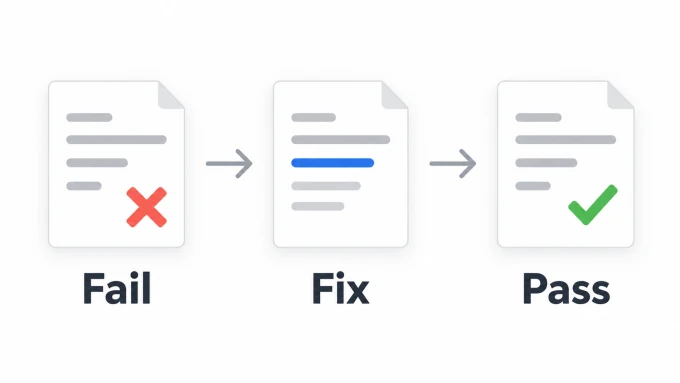
For a new feature or bug fix, ask Claude to write and run the test before editing the implementation:
We need to reject sessions at the exact expiry time, not just after it.
Write a regression test using a fixed clock. Run it and show that it
fails because the session is accepted. Do not change the implementation
until we have that failure.
Then ask for the fix:
Make the smallest implementation change that satisfies the test.
Keep the assertion intact. Rerun the regression test and the existing
suite. Explain what changed and flag anything you could not verify.
The first failure matters. An import error does not establish that the test catches the bug. Neither does a test that already passes. Read the failure and check that it describes the behavior you intended to change.
Anthropic’s best practices recommend executable checks and evidence of the result.
Test the browser with Playwright and MCP
Unit tests cannot tell you whether a submit button is hidden behind a dialog or a customer can complete a journey. For those checks, Claude needs access to the running app.
If your project already uses Playwright, Claude can edit its tests and run npx playwright test through the terminal. MCP is optional. It is useful when you want Claude to interactively open pages, inspect their structure, click controls, and investigate a failure before writing a regression test.
To connect Microsoft’s Playwright MCP server, run this once in your project’s terminal:
claude mcp add --transport stdio playwright -- npx -y @playwright/mcp@latestThis requires Node.js and npm. In a new Claude Code session, use /mcp to check the connection. The -- separates Claude’s configuration options from the server command; Anthropic’s MCP documentation covers scopes, connection status, and permissions.
Start your app with its usual development command, or ask Claude to do that. Then give it the local URL and a bounded browser task:
Use Playwright to check the sign-in form at the local URL I provided.
Try an empty submission and an invalid password using the test account.
Check that each error is visible and that the form can be corrected.
Do not use production accounts or submit real payments.

Show what you observed. Add a Playwright regression test for one useful
case, following this project's setup, and run that saved test.
Exploring the page and saving a test are separate steps. A successful interaction in the conversation does not leave you with a check that will run on the next pull request. Ask for the test file, its assertions, and the command that executed it.
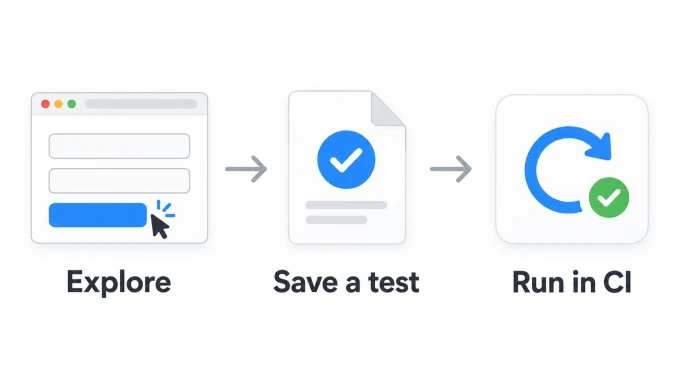
In the saved test, prefer controls located by their accessible names, check visible outcomes, and give each test its own state. Playwright’s testing guidance explains these choices. A test that clicks Submit but never checks the resulting error or success state is incomplete.
For terminal-led browser work, Playwright CLI and skills are another option. You do not need both interfaces. Limit access to what the task requires, especially when connecting external services.
Keep testing instructions in the project
Once you have a workflow that works, put the recurring details in CLAUDE.md: the real test command, required local services, fixture conventions, and any restrictions on test data. For a project where npm test already runs the suite, a short section could be:
## Testing
- Run the suite with npm test.
- Follow the fixtures and assertion style in nearby tests.
- Use a fixed clock for time-dependent behavior.
- Do not skip failing tests or weaken assertions to get a passing run.
- Report the commands run, results, and any tests you could not execute.
Replace that command with your project’s actual command. Keep the file specific enough to be useful. Claude reads CLAUDE.md as context, not enforced configuration, so important requirements still need checks outside the conversation.
Keep the regression suite in CI so it checks the submitted change, regardless of who wrote it. Session instructions do not replace that check.
Review the tests, not just the pass count
A large set of passing tests can still miss an important rule. Our comparison below starts with exactly that situation.
Before accepting a change, ask:
- Does the assertion check the behavior we actually want?
- Would a plausible bug make this test fail?
- Are mocks replacing an external dependency, or hiding the behavior under test?
- Is the test independent of the real clock, execution order, and leftover data?
- Did Claude run the saved test and the relevant existing suite?
- Were assertions, snapshots, or test exclusions changed just to get a pass?
For important logic, consider mutation testing: introduce small changes to the implementation and check whether the tests detect them. Inspect surviving mutations; some expose gaps, while others may not change observable behavior. Even a targeted check of one likely bug can tell you more than another batch of nearly identical tests.
What happened in our comparison
On September 14, 2026, we asked Claude Code to improve the tests for a small checkout module. Every session received identical source code, a written contract, ten starter tests and installed dependencies. The starter suite already had 100% Vitest V8 line and branch coverage.
We ran three sessions with native coverage, three with Supercov available, and three with Stryker available. All could use Vitest. The extra tools were part of the assigned workflow, not automatically selected by Claude.
For evaluation, we prepared 16 separate faults: accepting an expired session, ignoring a quantity, mishandling coupon expiry, changing shipping and refund boundaries, and similar mistakes. Claude could not see this fault list or the evaluator’s tests. The original suite caught none of them.
| Tools available | Faults caught in each of three runs | Tests added, in run order |
|---|---|---|
| Vitest V8 coverage | 16/16, 16/16, 16/16 | 41, 38, 39 |
| Vitest + Supercov | 16/16, 16/16, 16/16 | 46, 38, 38 |
| Vitest + Stryker | 16/16, 16/16, 16/16 | 40, 31, 36 |
Neither extra tool improved fault detection on this fixture. Claude could find the missing cases from the small implementation and explicit contract using native coverage alone.
For example, the first native-coverage run added this test:
test('standard shipping is free at exactly 5000 cents', () => {
  expect(quote([{price: 5000, quantity: 1}]))
    .toEqual({subtotal: 5000, discount: 0, shipping: 0, tax: 1000, total: 6000});
});
Changing the shipping threshold from >= 5000 to > 5000 passed the original
tests but failed this one. Both branches were already covered; the boundary
was not checked. The other workflows found it too.
What happened to assertion coverage?
Supercov reported seven missing MC/DC conditions in the starter suite. All three Supercov sessions closed those gaps. Assertion mapping took additional work: two sessions reached credit for all 21 measured statements; one left seven draft flows and an unresolved change assessment, earning no statement credit.
Even the two 100% statement results were not complete inventories of every assertion: 39 and 36 recorded assertions respectively remained without flow explanations. The score means each measured statement had a credited agent-assessed explanation, not that every assertion was reviewed or every possible fault would fail a test. We did not independently audit every map claim, and did not repair any map for publication.
Limits and reproduction
Claude Code 2.1.211 reported model identifier claude-opus-5[1m] in all nine
sessions. The tools were Vitest 5.0.0, Supercov 0.0.48 and Stryker 10.0.0.
Each session had a seven-minute limit and a $2 API-equivalent usage ceiling.
Only test additions and Supercov assertion maps were allowed to change.
This was a constrained workflow comparison, not a clean estimate of each tool’s effect. Permissions denied some helper commands, including arithmetic scripts and report-processing pipelines. Supercov sessions were also asked to attempt assertion mapping, an extra deliverable. Up to two sessions ran on the same machine; durations are not a speed benchmark.
All nine final suites passed three clean runs with protected files unchanged. We then applied each fault separately in a fresh evaluation workspace. A failing assertion was required to count it as caught. The 16-fault result is not Stryker’s generated-mutation score or a Supercov coverage percentage.
Every run caught all 16 faults on this tiny fixture. That tells us nothing about larger, unfamiliar repositories. Showing a coverage gap isn’t proof that an agent needs another tool to find it.
That is separate from the cost of running tests repeatedly. Browser and integration tests may change the tradeoff, but an assertion review also takes agent time. Our follow-up execution-cost checks explain what we measured and why they do not yet establish a Supercov speed advantage.
Download the fixture, saved tests, evaluator and redacted traces, or inspect all nine results and exact prompts as JSON. The README explains how to rerun the saved tests without a Claude account. Repeating the agent sessions is optional and consumes your own agent usage.
Find the remaining coverage gaps with Supercov
Once Claude can run your tests, coverage data can help it choose the next useful one. Supercov reports line, branch, MC/DC, and assertion coverage, with file-level detail the agent can inspect.
For a project whose existing suite runs with npm test, the commands are:
npx supercov -- npm test
npx supercov runs latest
npx supercov runs latest gaps
Everything after -- is your test command. You can ask Claude to run these and use the result:
Measure code coverage with npx supercov. Inspect MC/DC gaps. Read
npx supercov docs assertions and npx supercov docs assertion-agent,
then build or update the assertion map and review the result.
Add a useful test for the intended behavior. Only change tests and
the map. Rerun the suite, update the map, and show what the test checks
and what changed. Report failures instead of changing application code.
MC/DC is measured during the test run. Assertion coverage needs the mapping step; running the suite alone does not establish what each assertion checks.
In our JavaScript MC/DC example, line and branch coverage were already 100%, but the tests never checked an expired session. One additional test checked that case and made removing the expiry guard detectable.
That is the use of coverage here: evidence for a specific missing test, not proof that the whole application is correct. The agent workflow guide shows how to repeat the process in your own project.